

Updated Mar-2025 Test Engine or PDF for the Fortinet FCSS_SOC_AN-7.4 test to help you quickly prepare for the Fortinet exam!
Full FCSS_SOC_AN-7.4 Practice Test and 60 unique questions with explanations waiting just for you, get it now!
NEW QUESTION # 33
Which role does a threat hunter play within a SOC?
- A. Collect evidence and determine the impact of a suspected attack
- B. Monitor network logs to identify anomalous behavior
- C. investigate and respond to a reported security incident
- D. Search for hidden threats inside a network which may have eluded detection
Answer: D
Explanation:
* Role of a Threat Hunter:
* A threat hunter proactively searches for cyber threats that have evaded traditional security defenses. This role is crucial in identifying sophisticated and stealthy adversaries that bypass automated detection systems.
* Key Responsibilities:
* Proactive Threat Identification:
* Threat hunters use advanced tools and techniques to identify hidden threats within the network. This includes analyzing anomalies, investigating unusual behaviors, and utilizing threat intelligence.
NEW QUESTION # 34
In the context of threat hunting, which information feeds are most beneficial?
- A. Corporate governance updates
- B. Stock market trends
- C. Marketing data
- D. Cyber threat intelligence
Answer: D
NEW QUESTION # 35
When does FortiAnalyzer generate an event?
- A. When a log matches a filter in a data selector
- B. When a log matches a rule in an event handler
- C. When a log matches a task in a playbook
- D. When a log matches an action in a connector
Answer: B
Explanation:
* Understanding Event Generation in FortiAnalyzer:
* FortiAnalyzer generates events based on predefined rules and conditions to help in monitoring and responding to security incidents.
* Analyzing the Options:
* Option A:Data selectors filter logs based on specific criteria but do not generate events on their own.
* Option B:Connectors facilitate integrations with other systems but do not generate events based on log matches.
* Option C:Event handlers are configured with rules that define the conditions under which events are generated. When a log matches a rule in an event handler, FortiAnalyzer generates an event.
* Option D:Tasks in playbooks execute actions based on predefined workflows but do not directly generate events based on log matches.
* Conclusion:
* FortiAnalyzer generates an event when a log matches a rule in an event handler.
References:
* Fortinet Documentation on Event Handlers and Event Generation in FortiAnalyzer.
* Best Practices for Configuring Event Handlers in FortiAnalyzer.
NEW QUESTION # 36
When configuring a FortiAnalyzer to act as a collector device, which two steps must you perform?(Choose two.)
- A. Configure Fabric authorization on the connecting interface.
- B. Enable log compression.
- C. Configure the data policy to focus on archiving.
- D. Configure log forwarding to a FortiAnalyzer in analyzer mode.
Answer: A,D
NEW QUESTION # 37
Which outcome indicates successful integration of connectors in a SOC playbook?
- A. Increased manual interventions in processes
- B. Frequent need for system reboots
- C. High visibility of internal operations to the public
- D. Seamless interaction between different security systems
Answer: D
NEW QUESTION # 38
Which two ways can you create an incident on FortiAnalyzer? (Choose two.)
- A. By running a playbook
- B. Manually, on the Event Monitor page
- C. Using a connector action
- D. Using a custom event handler
Answer: B,D
Explanation:
* Understanding Incident Creation in FortiAnalyzer:
* FortiAnalyzer allows for the creation of incidents to track and manage security events.
* Incidents can be created both automatically and manually based on detected events and predefined rules.
* Analyzing the Methods:
* Option A:Using a connector action typically involves integrating with other systems or services and is not a direct method for creating incidents on FortiAnalyzer.
* Option B:Incidents can be created manually on the Event Monitor page by selecting relevant events and creating incidents from those events.
* Option C:While playbooks can automate responses and actions, the direct creation of incidents is usually managed through event handlers or manual processes.
* Option D:Custom event handlers can be configured to trigger incident creation based on specific events or conditions, automating the process within FortiAnalyzer.
* Conclusion:
* The two valid methods for creating an incident on FortiAnalyzer are manually on the Event Monitor page and using a custom event handler.
References:
* Fortinet Documentation on Incident Management in FortiAnalyzer.
* FortiAnalyzer Event Handling and Customization Guides.
NEW QUESTION # 39
In managing connectors within a SOC, what is a key benefit of ensuring proper integration?
- A. It reduces the need for cybersecurity training
- B. It simplifies the legal compliance of the SOC
- C. It enhances the aesthetic appeal of the SOC
- D. It ensures seamless data exchange and process automation
Answer: D
NEW QUESTION # 40
Refer to the exhibits.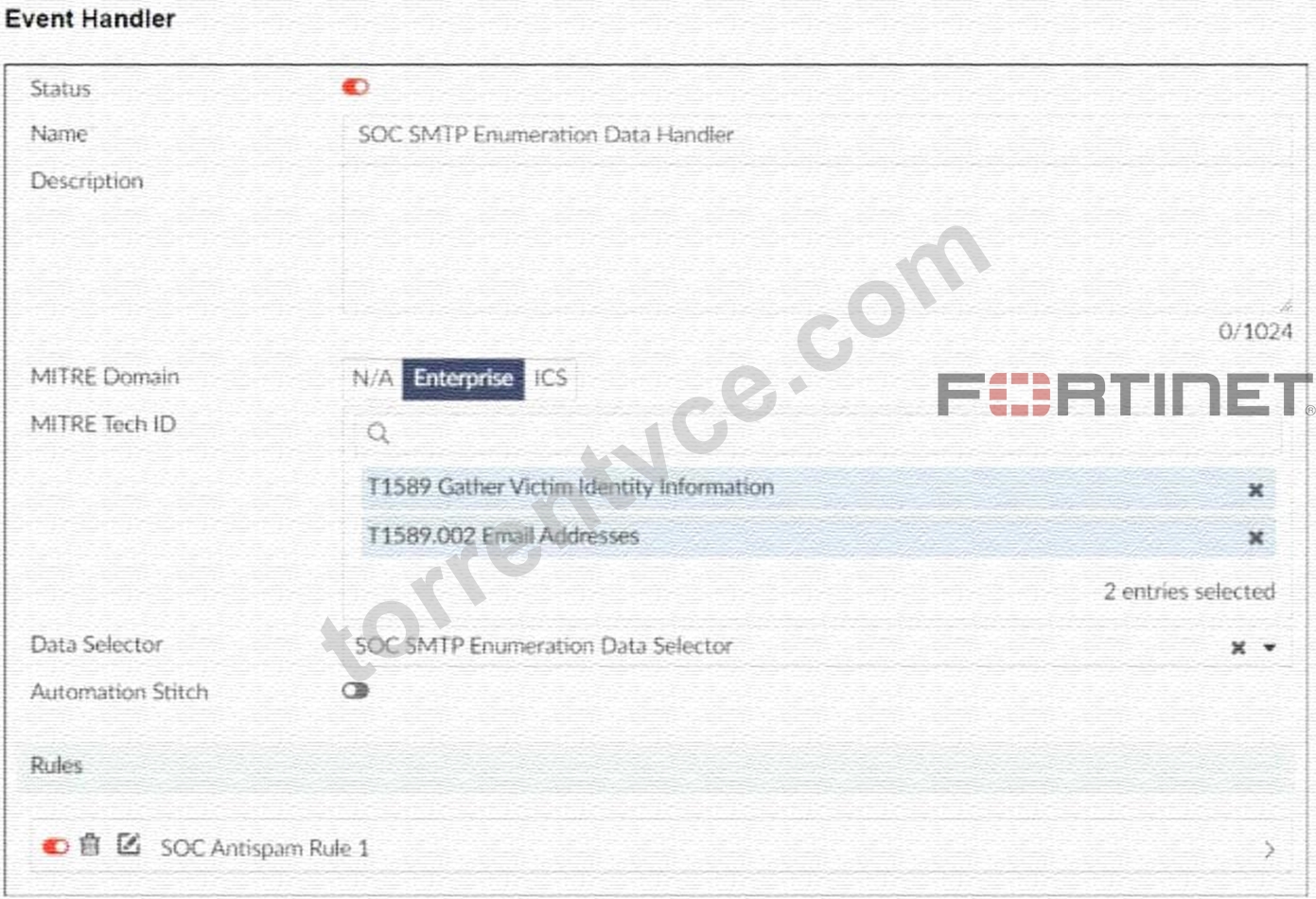
You configured a custom event handler and an associated rule to generate events whenever FortiMail detects spam emails. However, you notice that the event handler is generating events for both spam emails and clean emails.
Which change must you make in the rule so that it detects only spam emails?
- A. In the Trigger an event when field, select Within a group, the log field Spam Name (snane) has 2 or more unique values.
- B. In the Log filter by Text field, type type==spam.
- C. In the Log Type field, select Anti-Spam Log (spam)
- D. Disable the rule to use the filter in the data selector to create the event.
Answer: C
Explanation:
* Understanding the Custom Event Handler Configuration:
* The event handler is set up to generate events based on specific log data.
* The goal is to generate events specifically for spam emails detected by FortiMail.
* Analyzing the Issue:
* The event handler is currently generating events for both spam emails and clean emails.
* This indicates that the rule's filtering criteria are not correctly distinguishing between spam and non-spam emails.
* Evaluating the Options:
* Option A:Selecting the "Anti-Spam Log (spam)" in the Log Type field will ensure that only logs related to spam emails are considered. This is the most straightforward and accurate way to filter for spam emails.
* Option B:Typingtype==spamin the Log filter by Text field might help filter the logs, but it is not as direct and reliable as selecting the correct log type.
* Option C:Disabling the rule to use the filter in the data selector to create the event does not address the issue of filtering for spam logs specifically.
* Option D:Selecting "Within a group, the log field Spam Name (snane) has 2 or more unique values" is not directly relevant to filtering spam logs and could lead to incorrect filtering criteria.
* Conclusion:
* The correct change to make in the rule is to select "Anti-Spam Log (spam)" in the Log Type field.
This ensures that the event handler only generates events for spam emails.
References:
* Fortinet Documentation on Event Handlers and Log Types.
* Best Practices for Configuring FortiMail Anti-Spam Settings.
NEW QUESTION # 41
What is a key objective of managing outbreak alert handlers in a SOC?
- A. To increase sales and marketing efforts
- B. To quickly contain and mitigate threats
- C. To minimize the impact of false positives
- D. To ensure seamless business operations
Answer: B
NEW QUESTION # 42
Configuring playbook triggers correctly is crucial for which aspect of SOC automation?
- A. Automating responses to detected incidents based on predefined conditions
- B. Increasing the manual tasks in the SOC
- C. Making sure that SOC analysts are kept busy
- D. Ensuring that all security incidents receive a human response
Answer: A
NEW QUESTION # 43
What is the primary function of event handlers in a SOC operation?
- A. To monitor the health of IT equipment
- B. To generate financial reports
- C. To automate responses to detected events
- D. To provide technical support to end-users
Answer: C
NEW QUESTION # 44
In the context of SOC operations, mapping adversary behaviors to MITRE ATT&CK techniques primarily helps in:
- A. Understanding the attack lifecycle
- B. Speeding up system recovery
- C. Facilitating regulatory compliance
- D. Predicting future attacks
Answer: A
NEW QUESTION # 45
How does identifying adversary behavior benefit SOC operations in terms of incident response?
- A. By reducing the importance of endpoint security
- B. By allowing for a quicker isolation of affected systems
- C. By increasing the time it takes to respond to incidents
- D. By providing data for marketing strategies
Answer: B
NEW QUESTION # 46
You are not able to view any incidents or events on FortiAnalyzer.
What is the cause of this issue?
- A. FortiAnalyzer is operating in collector mode.
- B. There are no open security incidents and events.
- C. FortiAnalyzer must be in a Fabric ADOM.
- D. FortiAnalyzer is operating as a Fabric supervisor.
Answer: A
NEW QUESTION # 47
While monitoring your network, you discover that one FortiGate device is sending significantly more logs to FortiAnalyzer than all of the other FortiGate devices in the topology.
Additionally, the ADOM that the FortiGate devices are registered to consistently exceeds its quota.
What are two possible solutions? (Choose two.)
- A. Reconfigure the first FortiGate device to reduce the number of logs it forwards to FortiAnalyzer.
- B. Increase the storage space quota for the first FortiGate device.
- C. Configure data selectors to filter the data sent by the first FortiGate device.
- D. Create a separate ADOM for the first FortiGate device and configure a different set of storage policies.
Answer: A,D
Explanation:
* Understanding the Problem:
* One FortiGate device is generating a significantly higher volume of logs compared to other devices, causing the ADOM to exceed its storage quota.
* This can lead to performance issues and difficulties in managing logs effectively within FortiAnalyzer.
* Possible Solutions:
* The goal is to manage the volume of logs and ensure that the ADOM does not exceed its quota, while still maintaining effective log analysis and monitoring.
* Solution A: Increase the Storage Space Quota for the First FortiGate Device:
* While increasing the storage space quota might provide a temporary relief, it does not address the root cause of the issue, which is the excessive log volume.
* This solution might not be sustainable in the long term as log volume could continue to grow.
* Not selected as it does not provide a long-term, efficient solution.
* Solution B: Create a Separate ADOM for the First FortiGate Device and Configure a Different Set of Storage Policies:
* Creating a separate ADOM allows for tailored storage policies and management specifically for the high-log-volume device.
* This can help in distributing the storage load and applying more stringent or customized retention and storage policies.
* Selected as it effectively manages the storage and organization of logs.
* Solution C: Reconfigure the First FortiGate Device to Reduce the Number of Logs it Forwards to FortiAnalyzer:
* By adjusting the logging settings on the FortiGate device, you can reduce the volume of logs forwarded to FortiAnalyzer.
* This can include disabling unnecessary logging, reducing the logging level, or filtering out less critical logs.
* Selected as it directly addresses the issue of excessive log volume.
* Solution D: Configure Data Selectors to Filter the Data Sent by the First FortiGate Device:
* Data selectors can be used to filter the logs sent to FortiAnalyzer, ensuring only relevant logs are forwarded.
* This can help in reducing the volume of logs but might require detailed configuration and regular updates to ensure critical logs are not missed.
* Not selected as it might not be as effective as reconfiguring logging settings directly on the FortiGate device.
* Implementation Steps:
* For Solution B:
* Step 1: Access FortiAnalyzer and navigate to the ADOM management section.
* Step 2: Create a new ADOM for the high-log-volume FortiGate device.
* Step 3: Register the FortiGate device to this new ADOM.
* Step 4: Configure specific storage policies for the new ADOM to manage log retention and storage.
* For Solution C:
* Step 1: Access the FortiGate device's configuration interface.
* Step 2: Navigate to the logging settings.
* Step 3: Adjust the logging level and disable unnecessary logs.
* Step 4: Save the configuration and monitor the log volume sent to FortiAnalyzer.
References:
* Fortinet Documentation on FortiAnalyzer ADOMs and log management FortiAnalyzer Administration Guide
* Fortinet Knowledge Base on configuring log settings on FortiGate FortiGate Logging Guide By creating a separate ADOM for the high-log-volume FortiGate device and reconfiguring its logging settings, you can effectively manage the log volume and ensure the ADOM does not exceed its quota.
NEW QUESTION # 48
Which feature should be prioritized when configuring collectors in a high-traffic network environment?
- A. Periodic storage expansion
- B. Aesthetic interface adjustments
- C. High-frequency log rotation
- D. Low-latency data processing
Answer: D
NEW QUESTION # 49
Which component of the Fortinet SOC solution is best suited for centralized log management?
- A. FortiSandbox
- B. FortiClient
- C. FortiAnalyzer
- D. FortiGate
Answer: C
NEW QUESTION # 50
Which MITRE ATT&CK tactic involves an adversary trying to maintain their foothold within a network?
- A. Persistence
- B. Initial Access
- C. Execution
- D. Discovery
Answer: A
NEW QUESTION # 51
Which connector on FortiAnalyzer is responsible for looking up indicators to get threat intelligence?
- A. The FortiOS connector
- B. The FortiGuard connector
- C. The local connector
- D. The FortiClient EMS connector
Answer: B
NEW QUESTION # 52
Why is it crucial to configure playbook triggers based on accurate threat intelligence?
- A. To increase the number of digital advertisements
- B. To facilitate easier management of office supplies
- C. To ensure SOC parties are well-attended
- D. To prevent the triggering of irrelevant or false positive actions
Answer: D
NEW QUESTION # 53
Which feature is most important when selecting a connector for integration into a SOC playbook?
- A. The ability to display colorful graphics
- B. The compatibility with existing security infrastructure
- C. The size of the connector's installation file
- D. The connector's country of origin
Answer: B
NEW QUESTION # 54
In a FortiAnalyzer deployment, how does the configuration of analyzers affect the overall system performance?
- A. By influencing the speed and accuracy of log analysis
- B. By determining the user access levels
- C. By dictating the graphical user interface design
- D. By setting the network timezone settings
Answer: A
NEW QUESTION # 55
How does regular monitoring of playbook performance benefit SOC operations?
- A. It ensures playbooks adapt to evolving threat landscapes
- B. It enhances the social media presence of the SOC
- C. It increases the workload on human resources
- D. It reduces the necessity for cybersecurity insurance
Answer: A
NEW QUESTION # 56
Which National Institute of Standards and Technology (NIST) incident handling phase involves removing malware and persistence mechanisms from a compromised host?
- A. Recovery
- B. Containment
- C. Eradication
- D. Analysis
Answer: C
NEW QUESTION # 57
Which statement best describes the MITRE ATT&CK framework?
- A. It describes attack vectors targeting network devices and servers, but not user endpoints.
- B. It covers tactics, techniques, and procedures, but does not provide information about mitigations.
- C. Itprovides a high-level description of common adversary activities, but lacks technical details
- D. It contains some techniques or subtechniques that fall under more than one tactic.
Answer: D
Explanation:
* Understanding the MITRE ATT&CK Framework:
* The MITRE ATT&CK framework is a comprehensive matrix of tactics and techniques used by adversaries to achieve their objectives.
* It is widely used for understanding adversary behavior, improving defense strategies, and conducting security assessments.
* Analyzing the Options:
* Option A:The framework provides detailed technical descriptions of adversary activities, including specific techniques and subtechniques.
* Option B:The framework includes information about mitigations and detections for each technique and subtechnique, providing comprehensive guidance.
* Option C:MITRE ATT&CK covers a wide range of attack vectors, including those targeting user endpoints, network devices, and servers.
* Option D:Some techniques or subtechniques do indeed fall under multiple tactics, reflecting the complex nature of adversary activities that can serve different objectives.
* Conclusion:
* The statement that best describes the MITRE ATT&CK framework is that it contains some techniques or subtechniques that fall under more than one tactic.
References:
* MITRE ATT&CK Framework Documentation.
* Security Best Practices and Threat Intelligence Reports Utilizing MITRE ATT&CK.
NEW QUESTION # 58
......
Get Latest FCSS_SOC_AN-7.4 Dumps Exam Questions: https://drive.google.com/open?id=1MtPEUPtSgbqcO_EGxir6f0XGMVvjKMgS
Full FCSS_SOC_AN-7.4 Practice Test and 60 unique questions with explanations waiting just for you, get it now: https://www.torrentvce.com/FCSS_SOC_AN-7.4-valid-vce-collection.html