

Download Linux Foundation CKA Exam Dumps to Pass Exam Easily in 2026
Get 100% Real Free Kubernetes Administrator CKA Sample Questions
Linux Foundation CKA certification has become a benchmark for Kubernetes expertise in the industry. Organizations are increasingly seeking certified Kubernetes administrators to manage their Kubernetes infrastructure. Certified Kubernetes Administrator (CKA) Program Exam certification not only validates the candidate's skills but also demonstrates their commitment to keeping up with the latest industry trends and technologies. The CKA certification provides a competitive edge to the candidate and opens up new career opportunities.
NEW QUESTION # 34
Create an nginx pod with containerPort 80 and with a PersistentVolumeClaim "task-pv-claim" and has a mouth path "/usr/share/nginx/html"
- A. vim nginx-pvc-pod.yaml
apiVersion: v1
kind: Pod
metadata:
name: task-pv-pod
spec:
volumes:
- name: task-pv-storage
persistentVolumeClaim:
claimName: task-pv-claim
containers:
- name: task-pv-container
image: nginx
ports:
- containerPort: 60
name: "http"
volumeMounts:
- mountPath: "/usr/share/nginx/html"
name: task-pv-storage
kubectl apply -f nginx-pvc-pod.yaml
// Verify
kubectl describe po "POD-Name" | grep -i volumes -A4
Volumes:
task-pv-storage:
Type: PersistentVolumeClaim (a reference to a
PersistentVolumeClaim in the same namespace)
ClaimName: task-pv-claim
ReadOnly: false - B. vim nginx-pvc-pod.yaml
apiVersion: v1
kind: Pod
metadata:
name: task-pv-pod
spec:
volumes:
- name: task-pv-storage
persistentVolumeClaim:
claimName: task-pv-claim
containers:
- name: task-pv-container
image: nginx
ports:
- containerPort: 80
name: "http"
volumeMounts:
- mountPath: "/usr/share/nginx/html"
name: task-pv-storage
kubectl apply -f nginx-pvc-pod.yaml
// Verify
kubectl describe po "POD-Name" | grep -i volumes -A5
Volumes:
task-pv-storage:
Type: PersistentVolumeClaim (a reference to a
PersistentVolumeClaim in the same namespace)
ClaimName: task-pv-claim
ReadOnly: false
Answer: B
NEW QUESTION # 35
You have a Deployment running on a Kubernetes cluster with limited resources. How can you adjust the Deployment to use resources more efficiently and prevent resource contention?
Answer:
Explanation:
See the solution below with Step by Step Explanation.
Explanation:
Solution (Step by Step) :
1. Define Resource Requests and Limits:
- Set 'requests' and 'limits' for CPU and memory for the containers in the Deployment.
- This helps in specifying the minimum resources required by the pods and the maximum resources that they can consume.
2. Optimize Container Images: - Use smaller and more efficient container images to reduce the resource footprint of the pods. 3. Use Resource Quotas: - Apply resource quotas at the namespace level to control the resource consumption of the pods within a namespace. 4. Consider Pod Disruption Budgets (PDB): - Implement PDBs to control the maximum number of pods that can be unavailable during a rolling update or pod deletion. - This ensures that the application remains available during resource-intensive events. 5. Utilize Node Affinity and Tolerations: - Configure node affinity and tolerations to schedule pods on specific nodes that have the required resources. 6. Monitor Resource Utilization: - Regularly monitor the resource utilization of the cluster and the pods. - Use tools like 'kubectl top pods', 'kubectl top nodes', and 'kubectl describe nodes' to gather resource utilization data. - Adjust resource requests and limits accordingly based on the monitoring data.
NEW QUESTION # 36
You are managing a Kubernetes cluster with a team of developers. You need to ensure that each developer only has access to the resources they need. For example, Developer A can only access the 'frontend' namespace and deploy applications there.
Developer B can access the 'backend' namespace and manage deployments and services.
Developer C can access the 'monitoring' namespace and access only read-only access to pods and services.
Define the RBAC rules and create the necessary Role, RoleBinding, and ServiceAccount resources to achieve this access control policy.
Answer:
Explanation:
See the solution below with Step by Step Explanation.
Explanation:
Solution (Step by Step) :
1 . Create ServiceAccounts for each Developer:
kubectl create serviceaccount dev-a -n frontend
kubectl create serviceaccount dev-b -n backend
kubectl create serviceaccount dev-c -n monitoring
2. Create Roles for each Developer:
For Developer A:
For Developer B:
For Developer C:
3. Create RoleBindings: For Developer A:
For Developer B:
For Developer C:
NEW QUESTION # 37
You have a Deployment named 'worker-deployment' with 10 replicas of a worker container. You need to implement a rolling update strategy that allows for a maximum of 3 pods to be unavailable at any given time during the update process. You also want to ensure that the update process is completed within a specified timeout of 10 minutes. If the update fails to complete within the timeout, the deployment should revert to the previous version. Additionally, you want to implement a pause functionality to temporarily halt the rolling update process.
Answer:
Explanation:
See the solution below with Step by Step Explanation.
Explanation:
Solution (Step by Step) :
1. Update the Deployment YAML:
- Update the 'replicas' to 10.
- Define 'maxUnavailable: 3' and 'maxSurge: 0' in the 'strategy.rollingUpdate' section to control the rolling update process.
- Configure a 'strategy.type' to 'RollingUpdate' to trigger a rolling update when the deployment is updated.
- Set Always' to ensure that the new image is pulled even if it exists in the pod's local cache.
- Add a 'spec.progressDeadlineSeconds: 600' to set a timeout of 10 minutes for the update process.
2. Create the Deployment: - Apply the updated YAML file using 'kubectl apply -f worker-deployment.yaml' 3. Verify the Deployment: - Check the status of the deployment using 'kubectl get deployments worker-deployment' to confirm the rollout and updated replica count. 4. Trigger the Automatic Update: - Push a new image to the 'my.org/worker:latest' Docker Hub repository. 5. Monitor the Deployment: - Use "kubectl get pods -l app=worker' to monitor the pod updates during the rolling update process. 6. Pause the Rolling Update: - To pause the rolling update process, use the following command: bash kubectl rollout pause deployment worker-deployment 7. Resume the Rolling Update: - To resume the rolling update process, use the following command: bash kubectl rollout resume deployment worker-deployment 8. Observe Rollback if Timeout Exceeds: - If the update process takes longer than 10 minutes to complete, the deployment will be rolled back to the previous version. This can be observed using 'kubectl describe deployment worker-deployment' and checking the 'updatedReplicas' and 'availableReplicas" fields.
NEW QUESTION # 38
Deploy a pod with image=redis on a node with label disktype=ssd
- A. // Get list of nodes
kubectl get nodes
//Get node with the label disktype=ssd
kubectl get no -l disktype=ssd
// Create a sample yaml file
kubectl run node-redis --generator=run-pod/v1 --image=redis --dry
run -o yaml > test-redis.yaml
// Edit test-redis.yaml file and add nodeSelector
vim test-redis.yaml
apiVersion: v1
- name: node-redis
image: redis
imagePullPolicy: IfNotPresent
kubectl apply -f test-redis.yaml
/ // Verify
K kubectl get po -o wide - B. // Get list of nodes
kubectl get nodes
//Get node with the label disktype=ssd
kubectl get no -l disktype=ssd
// Create a sample yaml file
kubectl run node-redis --generator=run-pod/v1 --image=redis --dry
run -o yaml > test-redis.yaml
// Edit test-redis.yaml file and add nodeSelector
vim test-redis.yaml
apiVersion: v1
kind: Pod
metadata:
name: redis
spec:
nodeSelector:
disktype: ssd
containers:
- name: node-redis
image: redis
imagePullPolicy: IfNotPresent
kubectl apply -f test-redis.yaml
/ // Verify
K kubectl get po -o wide
Answer: B
NEW QUESTION # 39
Create a redis pod and mount "redis-config" as "redis.conf"
inside redis container, name the config volume as "redis-volume"
redis-config path - /opt/redis-config
- A. 0
- B. Pending
- C. 1
Answer: B
NEW QUESTION # 40
Monitor the logs of pod foo and:
Extract log lines corresponding to error
unable-to-access-website
Write them to /opt/KULM00201/foo
Answer:
Explanation:
solution
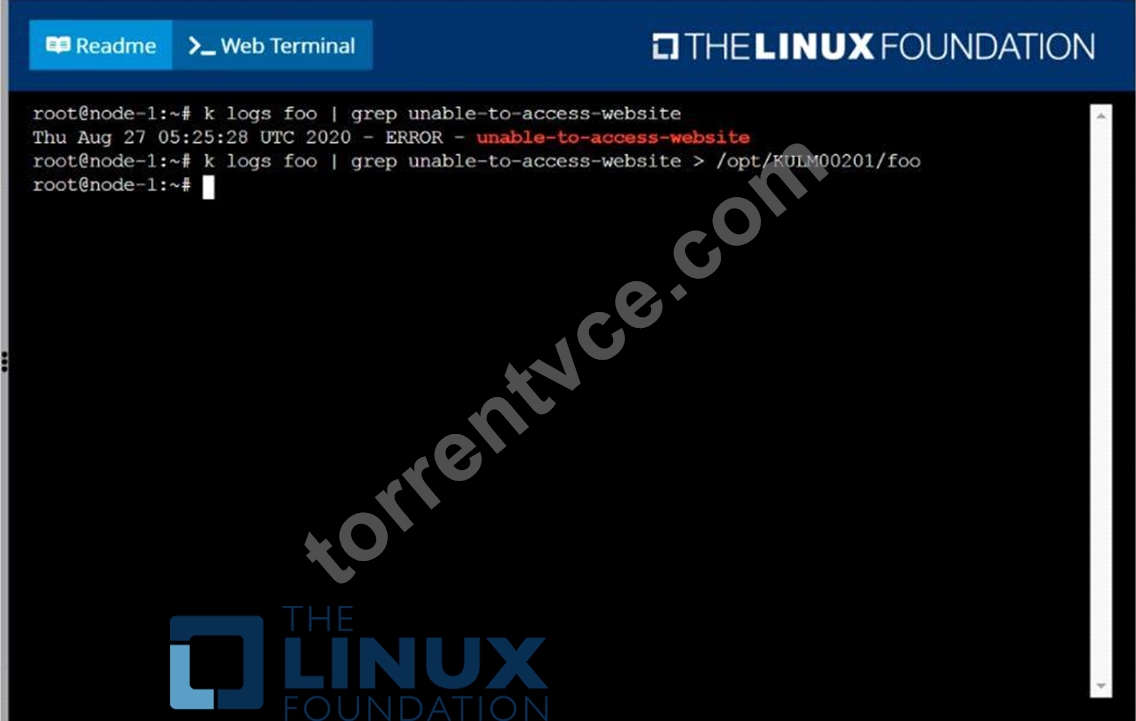
NEW QUESTION # 41
Score: 4%
Task
Schedule a pod as follows:
* Name: nginx-kusc00401
* Image: nginx
* Node selector: disk=ssd
Answer:
Explanation:
See the solution below.
Explanation
Solution:
#yaml
apiVersion: v1
kind: Pod
metadata:
name: nginx-kusc00401
spec:
containers:
- name: nginx
image: nginx
imagePullPolicy: IfNotPresent
nodeSelector:
disk: spinning
#
kubectl create -f node-select.yaml
NEW QUESTION # 42
Score: 4%
Context
You have been asked to create a new ClusterRole for a deployment pipeline and bind it to a specific ServiceAccount scoped to a specific namespace.
Task
Create a new ClusterRole named deployment-clusterrole, which only allows to create the following resource types:
* Deployment
* StatefulSet
* DaemonSet
Create a new ServiceAccount named cicd-token in the existing namespace app-team1.
Bind the new ClusterRole deployment-clusterrole lo the new ServiceAccount cicd-token , limited to the namespace app-team1.
Answer:
Explanation:
Solution:
Task should be complete on node k8s -1 master, 2 worker for this connect use command
[student@node-1] > ssh k8s
kubectl create clusterrole deployment-clusterrole --verb=create --resource=deployments,statefulsets,daemonsets kubectl create serviceaccount cicd-token --namespace=app-team1 kubectl create rolebinding deployment-clusterrole --clusterrole=deployment-clusterrole --serviceaccount=default:cicd-token --namespace=app-team1
NEW QUESTION # 43
Score: 7%
Task
Create a new nginx Ingress resource as follows:
* Name: ping
* Namespace: ing-internal
* Exposing service hi on path /hi using service port 5678
Answer:
Explanation:
See the solution below.
Explanation
Solution:
vi ingress.yaml
#
apiVersion: networking.k8s.io/v1
kind: Ingress
metadata:
name: ping
namespace: ing-internal
spec:
rules:
- http:
paths:
- path: /hi
pathType: Prefix
backend:
service:
name: hi
port:
number: 5678
#
kubectl create -f ingress.yaml
NEW QUESTION # 44
Print pod name and start time to "/opt/pod-status" file
Answer:
Explanation:
kubect1 get pods -o=jsonpath='{range .items[*]}{.metadata.name}{"\t"}{.status.podIP}{"\n"}{end}'
NEW QUESTION # 45
Score: 4%
Task
Scale the deployment presentation
Answer:
Explanation:
See the solution below.
Explanation
Solution:
kubectl get deployment
kubectl scale deployment.apps/presentation --replicas=6
NEW QUESTION # 46
Pause the rollout of the deployment
Answer:
Explanation:
kubectl rollout pause deploy webapp
NEW QUESTION # 47
Create a pod that echo "hello world" and then exists. Have the pod deleted automatically when it's completed See the solution below.
Answer:
Explanation:
kubectl run busybox --image=busybox -it --rm --restart=Never --
/bin/sh -c 'echo hello world'
kubectl get po # You shouldn't see pod with the name "busybox"
NEW QUESTION # 48
Score: 7%
Task
Create a new nginx Ingress resource as follows:
* Name: ping
* Namespace: ing-internal
* Exposing service hi on path /hi using service port 5678
Answer:
Explanation:
Solution:
vi ingress.yaml
#
apiVersion: networking.k8s.io/v1
kind: Ingress
metadata:
name: ping
namespace: ing-internal
spec:
rules:
- http:
paths:
- path: /hi
pathType: Prefix
backend:
service:
name: hi
port:
number: 5678
#
kubectl create -f ingress.yaml
NEW QUESTION # 49
......
CKA Study Guide Realistic Verified Dumps: https://www.torrentvce.com/CKA-valid-vce-collection.html
Accurate CKA Questions with Free and Fast Updates: https://drive.google.com/open?id=1eQm5X4gJE-SAPBw6P4pwZmv_uvHLYOzu